Picture an enterprise architect at a desk. Two screens, a coffee, and a printed copy of the ArchiMate specification with three colors of highlighter running through it. They are trying to remember whether an application component can be assigned to a business process, or whether it has to go through an application service first. The relationship matrix has the answer. It is also a dense grid of letter codes that nobody reads for pleasure.
I have been that architect. So have my students. ArchiTrek is a small tool I built to make that moment shorter.
People model by example
Here is the thing I kept noticing while teaching. When people start a diagram, they do not reason from the rules. They reason from examples. They find a model that looks close to the thing they want, and they copy its shape. The specification sits on the shelf. The example does the teaching.
This is not laziness. It is how most modeling is actually learned. The rules tell you what is allowed. An example tells you what a good answer looks like. The gap between those two is wide, and for a beginner it is the whole difficulty.
The ArchiMate relationship matrix lives entirely on the rules side of that gap. It is correct and complete and almost unusable as a learning aid. What a learner wants is not the matrix. It is one concrete example, on demand, for the exact two elements they are stuck on.
What ArchiTrek does
Here is the anecdote I use to explain it. Say you are sketching an IoT-driven digital transformation. You know the architecture will involve devices and nodes down in the technology layer, and you know they exist to serve strategic goals. What you do not know is how to connect the two. There is no single relationship that runs from a device to a goal. The link has to be assembled from a chain that climbs through several layers of the model.
ArchiTrek does that assembly for you. You drop the two elements onto the canvas and it finds the routes between them. It sorts the routes into buckets and labels every step, so you can see at a glance which relationships are direct and which are derived. A short panel explains why each route holds, so the tool is never a black box. Derived relationships are one of the harder ideas in ArchiMate, and seeing them named next to the direct ones is the fastest way I know to make the concept click.
A few controls make exploration quick. You can tell ArchiTrek how to rank the routes it finds, leaning toward stricter or more flexible connections depending on what your model needs. Right-click any relationship and it reverses direction, so you can test a path both ways without starting over. And you can filter the whole search by ArchiMate viewpoint, which narrows the elements and relationships to the ones that viewpoint allows and keeps the answer relevant to the stakeholder you are modeling for.
Hospitals, universities, and a Death Star
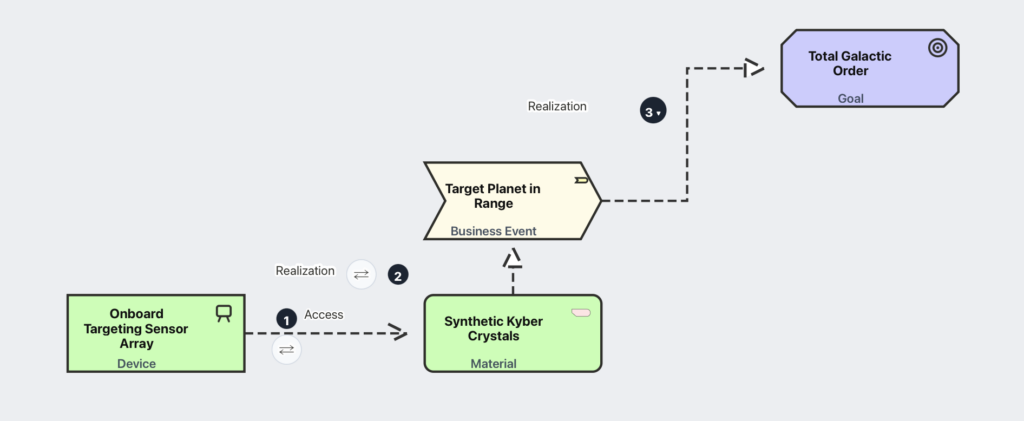
The elements you drop are not abstract. They live inside themed scenarios, each one a small world you can picture. There is a hospital and a university, the familiar teaching cases. There is a Formula 1 team. And there is a Death Star, because an architecture problem is easier to sit with when it is also a little bit fun. A learner is not connecting “Application Component A” to “Business Process B.” They are connecting things in a world that has characters and stakes, and that is what makes the example stick.
It runs in the browser. There is nothing to install.
It draws lines, and that is enough
One honest limitation. ArchiTrek draws relationship lines. It does not produce a finished, laid-out diagram with neat boxes and swimlanes. For a moment I thought that was a weakness.
It is not. When you are stuck early in a model, you are not asking for a polished picture. You are asking a narrow question. Is this connection legal, and what does a valid path look like? Lines answer that question completely. Anything more would be decoration. A small tool should do one thing.
Where it is going
ArchiTrek has not met a teaching cohort yet. That happens in September, when it goes into the Enterprise Architecture course. I expect to learn a lot from watching students use it, and I expect to fix things I cannot see right now. That is how a small tool earns its shape. You build it, you watch people use it, and you fix what confused them.
I can see two directions for it after that, though I am not promising either yet. One is a module of pre-built interactive ArchiMate diagrams, models you can poke at and rearrange rather than only read. The other is an on-demand generator for quiz-style questions, so the example generator becomes a practice generator. Both are still just ideas.
Try it
If you teach or learn ArchiMate, try it and tell me where it breaks. If you run an Enterprise Architecture course and want to use it with your own students, please do. Get in touch and I am glad to help.