You can map the backbone of your own research field in an afternoon. This tutorial shows how, step by step, with the tools I used.
A map like this helps in more places than a literature review:
- A field that is new to you. The path gives you a short reading list, in the order the ideas built on each other.
- A field you know well. Everyone has favorite papers. The path shows where the citations actually flow, and that is not always where your favorites sit.
- Teaching. I built a lecture on digital transformation around this map. Each framework came in with the question it answered when it was written.
- A new topic. Mark the new papers by their title words and you see whether they connect to the older line at all.
On LinkedIn I recently shared a map of 30 years of digital transformation research. It traces the main path through 872 papers, from Baskerville 1995 to Zimmer 2026 and Baiyere 2026. Over a hundred people saved it. Several asked how it was made.
The method is main path analysis, and Claude ran most of it. Below are the five steps, the prompts, and the two tools you need: my Scopus MCP server, a connector that lets Claude query Scopus, and a skill you can download.
The map we will build
This is the map from my post. Each dot is a paper and each arrow a citation. The dark blue line is the main path, the chain of citations that carries the most flow through the 872 papers.
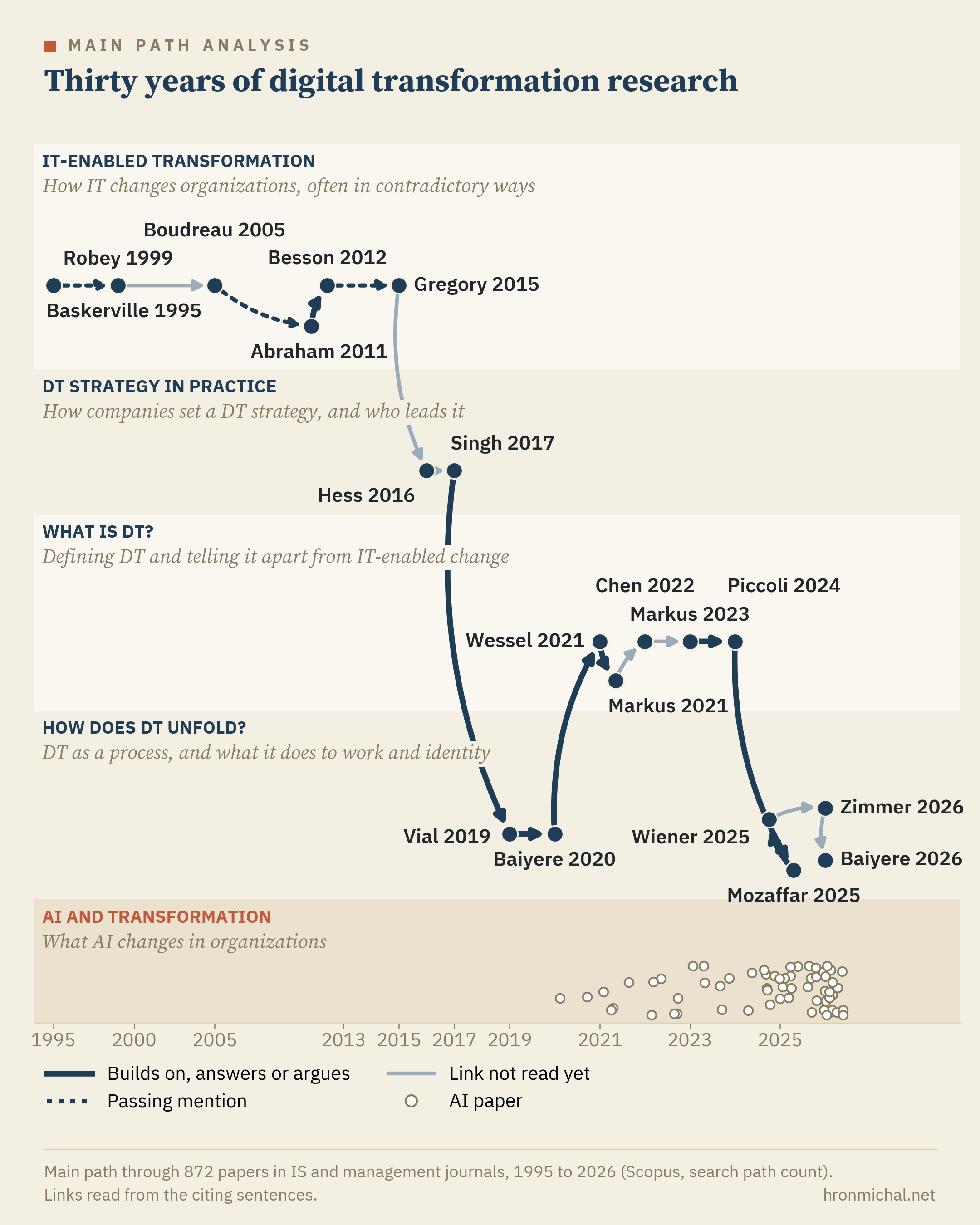
The lanes group the papers on the path by the question they ask: how IT changes organizations, how companies set a digital strategy, what digital transformation is, and how it unfolds. The band at the bottom holds the AI papers in the set. None of them sits on the path.
The line styles come from reading the sentence in which each paper cites the one before it. That reading is not part of this tutorial. Everything else on the map is.
What you need
You need four things, and you may already have the first two.
- Claude with connectors, in the desktop app or Claude Code.
- A Scopus API key from the Elsevier Developer Portal. Reference lists only come through with institutional Scopus access, so register with your university email and run it on campus or through your VPN. Without a subscription, the server also runs on OpenAlex, which needs no key.
- My MCP server, Scopus Plus: github.com/michalhron/scopus-plus-mcp. MCP is the connector standard that lets Claude call outside tools. This server lets Claude search Scopus, pull reference lists and build citation networks. The README has a one-click install for Claude Desktop and two commands for Claude Code.
- The main-path skill: get it here. A skill is a folder of instructions and scripts Claude follows for a task. This one walks Claude through the steps below and draws the map. In Claude Code it comes with the server’s plugin. For Claude Desktop, zip the folder and upload it as a skill.
You do not need to code. Claude runs the scripts. You make the decisions.
Step 1. Draw the boundary
What to do
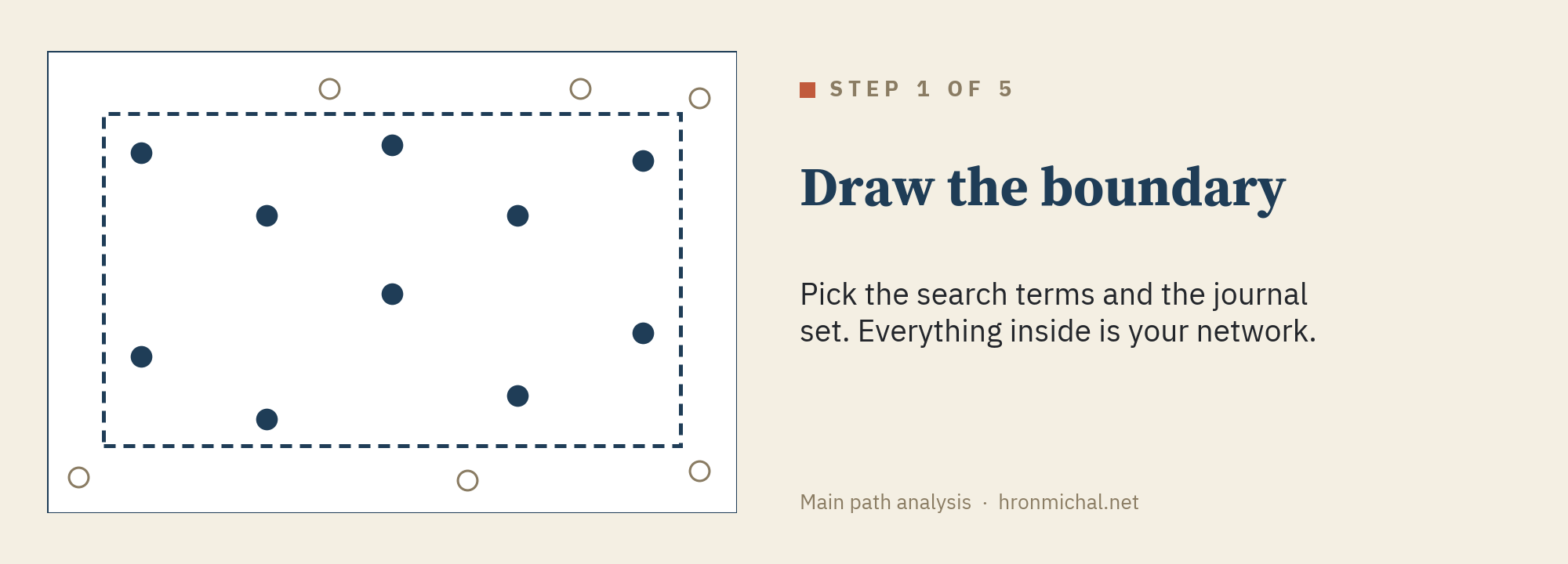
The boundary decides the map, so this step is yours. Claude can draft it. You decide.
If you have scoped a literature review, you know this step. A boundary has two parts: the search terms and the journal set (or conference set). Fields keep their questions but change their terms, so list the older terms too.
For the journals, start from a published list. LitBaskets (Wang, Boell and Ciriello 2026) sorts information systems (IS) journals into baskets, from the eight top journals to much larger sets. It is one way to slice a field into a set of papers to work with.
Outside IS, the MCP server can help you slice your own field. It finds the top journals in each discipline Scopus indexes, by their Scopus percentile, so you can keep the strongest journals in every field your topic touches. As far as I know, no other Scopus MCP server does this (comparison).
In practice:
- Develop the search terms as you would for a systematic literature review.
- Pick the journal set. In IS, you can choose a LitBaskets basket. In other fields, ask Claude for the top journals in your Scopus subject areas, for example the top quarter by percentile. Add conference proceedings if your field publishes there.
- Check whether the key papers you know are in the set. If some are missing, your terms are too narrow.
- Aim for 300 to 2,000 papers. Fewer gives a thin path, and more makes the next step slow. Over 2,000, narrow the journal set or add a term for your context. Under 300, widen it.
A prompt to start with:
I want to map research on [your topic] in [your journals]. List the older names this topic went by, draft a Scopus query with those terms and my journal list, and tell me how many papers it returns.
My example
My topic was digital transformation. Before that term caught on, the same research ran under names like IT-enabled transformation and digital business strategy. My query searched titles, abstracts and keywords for those terms. It also caught organizational transformation when IT, information systems or digital came up in the same text.
For the journals I took the LitBaskets medium basket and added MIS Quarterly Executive and the top-rated management journals in the Academic Journal Guide (AJG). That gave 872 papers from 1995 to 2026.
Step 2. Keep the links inside
What to do
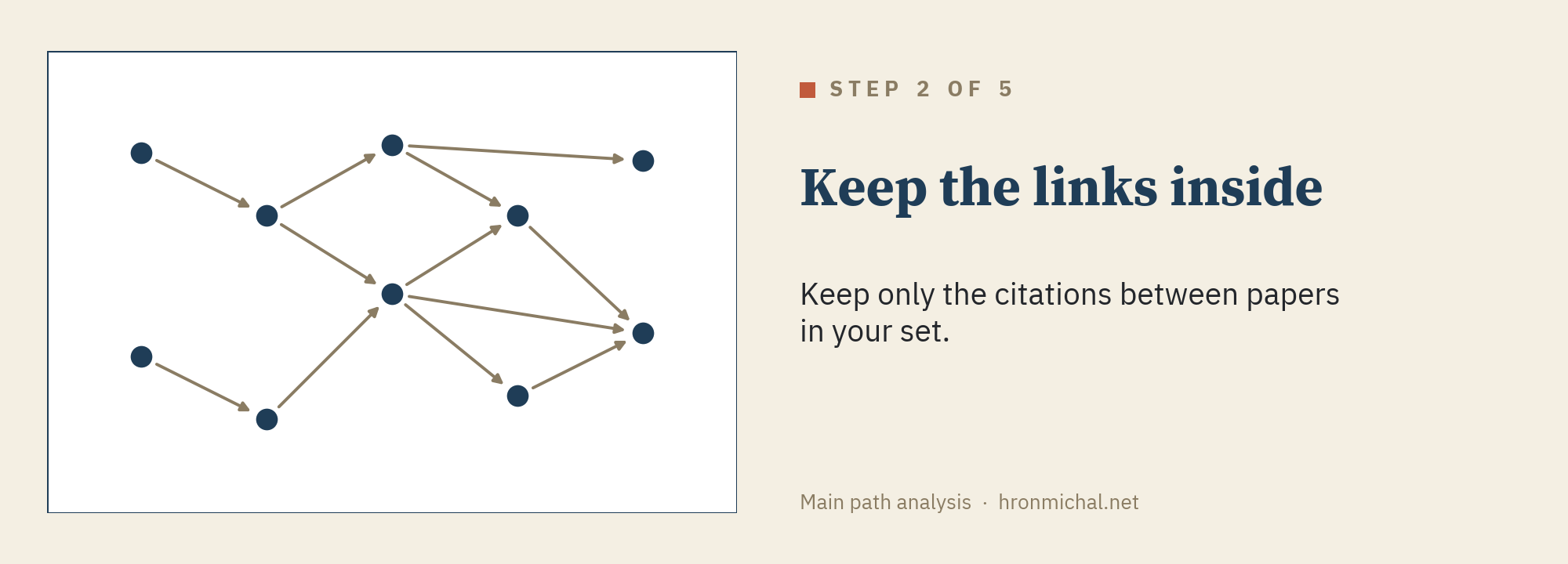
Now Claude asks the server for the citation network. The server pulls the reference list of every paper and keeps only the citations between papers in your set.
Pull the citation network for this query with completeness checks. Report the papers, the links inside the set, and any papers whose reference lists look short or appear twice.
Take the checks seriously. A paper whose reference list is cut short in Scopus can be cited but cannot cite, so it can fall off the path for the wrong reason. Duplicates matter too.
In practice:
- Run the prompt above. The server fetches one reference list per paper, so a large set takes a while. Results are cached, so a second run is fast.
- Look at the counts. Many papers with no links inside the set can mean your boundary pulls in work from outside the field.
- Look at the short reference lists. If a paper you know has one, remember it when you read the path.
- Remove duplicates: reprints, errata and the same paper indexed twice.
- Keep the files. The server saves the network for Pajek, VOSviewer or Gephi if you want to explore it outside Claude.
My example
My 872 papers had 3,718 links between them. The set also held a 2026 paper and its reprint, and the two tied for the last spot on the path.

Step 3. Weigh every link
What to do
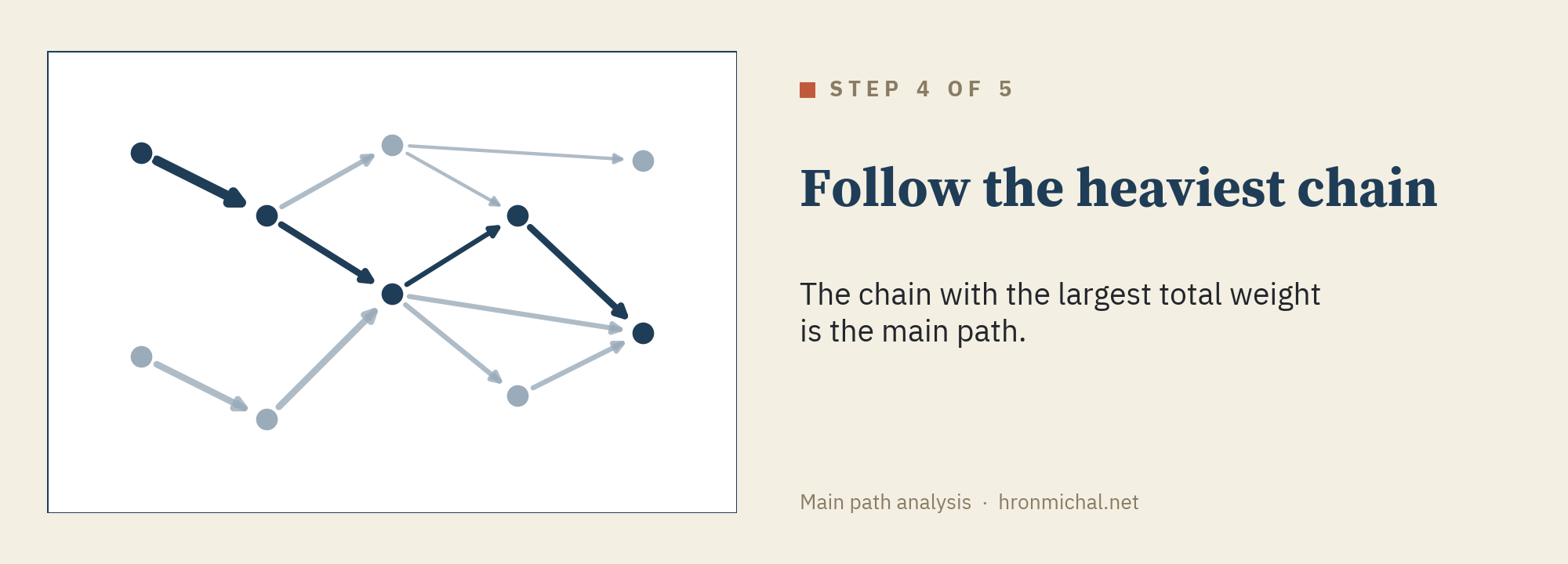
Every link gets a weight: the number of citation chains that run through it, from the oldest papers in the set to the newest. This is the search path count (Batagelj 2003). In the small example above, the link marked 5 sits on five different chains. A link that many chains pass through carries a large share of the field’s citation flow.
To count, multiply the chains that arrive at the older paper by the chains that leave the newer one. The server does this for all links at once, so this step needs no prompt of its own. It comes back with step 4.
In practice:
- There is nothing extra to run. The weights come with the main path in step 4.
- Ask Claude for the ten heaviest links, with the papers at both ends. They show where the citation flow concentrates.
- Compare weights only inside one network. They grow with the size of the network, so numbers from two different maps do not compare.
List the ten heaviest links in the network, with first author, year and title at both ends.
My example
The weights in my network are very uneven. The typical link sits on about 900 chains, while the heaviest sit on millions. The 100 heaviest links, under 3% of all links, carry almost two thirds of all the weight. That is why a few chains stand out in the next step.
Step 4. Follow the heaviest chain
What to do
The main path is the chain from an oldest paper to a newest one with the largest total weight (Hummon and Doreian 1989). Key routes add the next-heaviest chains, so you can see the main path’s neighbors too (Liu and Lu 2012).
Find the main path and the ten key routes. List the papers on the main path with first author, year and journal.
In practice:
- Read the list from top to bottom. Check that it starts where you expect the field to start and ends in recent years.
- Start reading with the papers on the path you do not know yet.
- Use the key routes to see what sits next to the path. Ten routes is a good start. Ask for more if a line of work you expect is missing.
- Save the list with authors, years, journals and DOIs. That is your reading list.
My example
My main path has 19 papers. It starts with Baskerville 1995 and Robey 1999 on IT and organizational change, then runs through Hess 2016 and Singh 2017 on digital strategy in practice. It reaches Wessel 2021 on what digital transformation is and ends with Zimmer 2026 and Baiyere 2026 on work and identity.
Step 5. Test the boundary
What to do
A different boundary gives a different path, so check how much yours depends on it.
The skill leaves this step out. You can still ask Claude to rerun with a narrower or wider journal list and compare the two paths.
In practice:
- Pick one narrower and one wider journal set, for example a smaller and a larger LitBaskets basket, or a top-10% and a top-25% cut-off.
- Ask Claude to rerun steps 2 to 4 for each set and compare the main paths.
- Papers that stay on the path in every version are the safest to call central. Papers that appear in only one version depend on your boundary.
Rerun the main path with [narrower journal set] and [wider journal set]. Show which papers stay on the path in every version and which ones change.
My example
I reran the analysis on six journal sets, from the eight top IS journals to the full set.
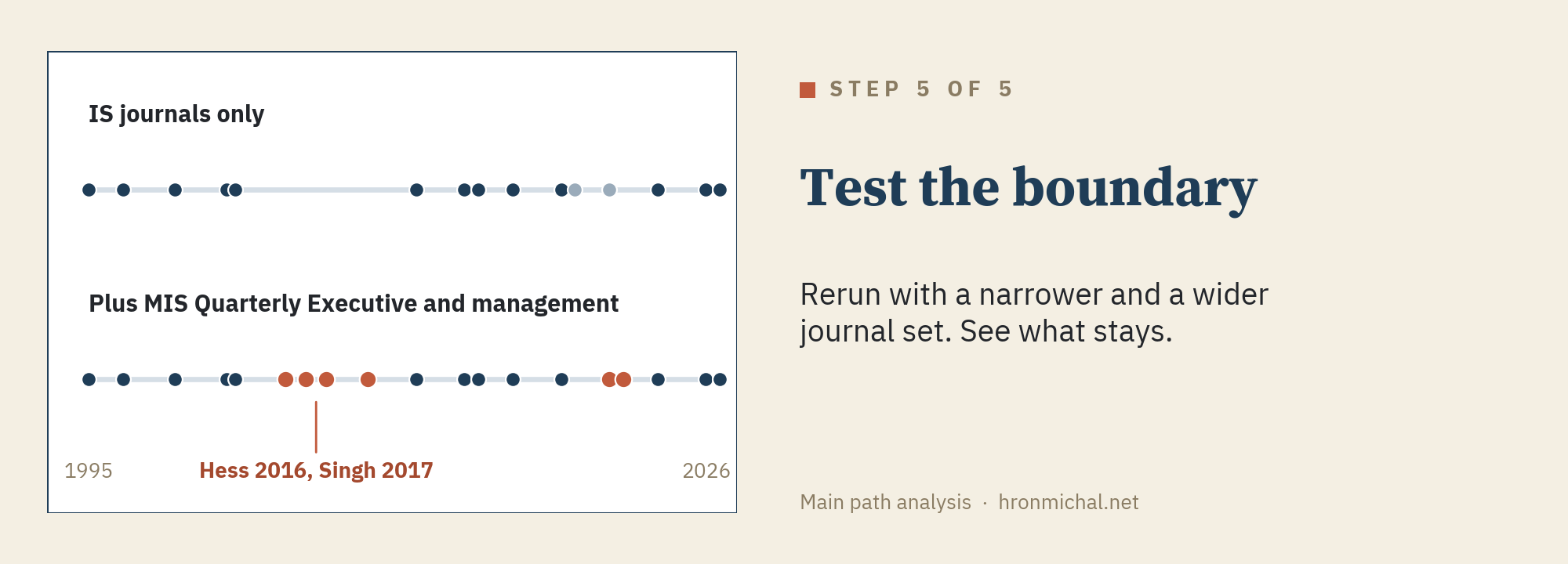
The oldest and newest papers on the path stayed the same in every version. The middle moved. With IS journals alone, the path skips the practice papers. Adding MIS Quarterly Executive brings in Hess 2016 and Singh 2017, and with them the lane on strategy in practice.
How I set up this check is part of a methods paper I am working on, so here you get only the result.
Draw the map, then read it
What to do
The skill draws the main path by year, in lanes you choose, with the papers you mark in a band at the bottom.
The lanes are the one part a script cannot do. They come from your reading of the papers, with Claude’s help. Start from the terms in your query, since each older name is a candidate lane. Then let Claude propose lanes from the abstracts and check them yourself.
Propose three to six topic lanes for the papers on the main path and key routes. Start from the terms in my query, use the titles and abstracts, and name each lane as a question. Say which paper goes in which lane.
Draw the main path by year. Use these lanes: [your groups]. Put papers whose titles mention AI in a band at the bottom.
Any topic you can spot by its title words can go in the band at the bottom.
In practice:
- Write down the terms from your query. Each older name is a candidate lane.
- Ask Claude to propose lanes from the titles and abstracts, with the first prompt above.
- Check the proposal against the abstracts. Move papers that sit wrong and rename the lanes in your own words, as questions such as “What is digital transformation?”
- Pick title words for the band at the bottom, for a topic you want to check against the path.
- Give Claude the lanes and the words with the second prompt. Check the labels and ask for a redraw if they overlap.
My example
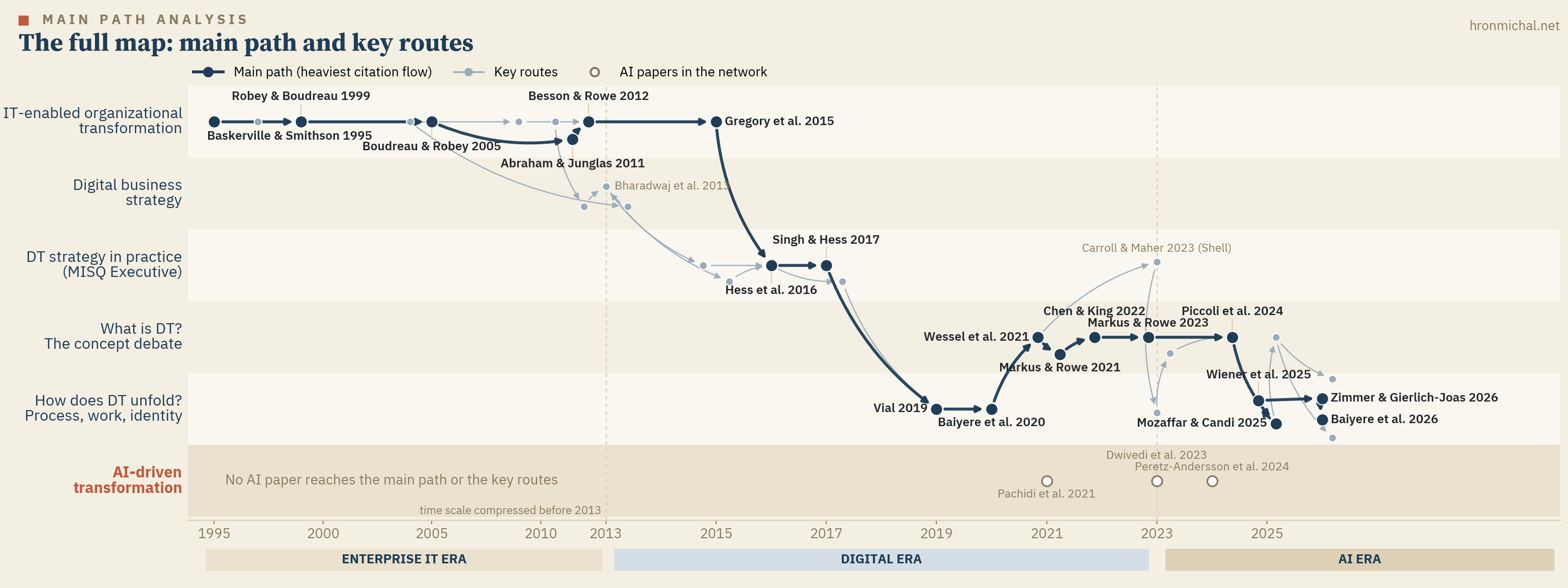
This is the full map behind my post. The main path runs in dark blue, and the key routes run in gray beside it. They show the papers that sit just off the path, such as Bharadwaj et al. 2013 on digital business strategy.
The terms from my query gave the first cut. The lane names came from my analysis of the abstracts of the 19 papers on the path, supported by Claude. Then Claude drew the papers in those lanes.
The band at the bottom is how I found the gap I wrote about in an earlier post. Dozens of AI papers sit in the set, and none of them reaches the main path.
Before you trust the map
- Show your query and journal list next to the map.
- The newest papers have had little time to be cited. The end of the path is the least settled part.
- The path shows where citations flow. Read the papers before you say what the field believes.
- Scopus covers what Scopus indexes, and some reference lists come through short. Check the papers you expected to see.
- Title matching is rough. Treat counts from it as estimates.
Is the literature review dead?
A speculative note to end. If Claude can pull 872 papers, find their backbone and draw it in an afternoon, a review that only maps and summarizes a field has little left to add. I think most such reviews are on their way out.
Two kinds will last. One theorizes and builds something new from what it reads. The other brings a new way of reading a literature. I have some ideas for the second kind. More on that when they are ready.
That leaves a question I cannot answer yet. A PhD student used to learn a field by reviewing it, and many of us still learn new fields that way later on. If the map now takes an afternoon, how do we learn a field?
Try it on your field
I want to do more with main path analysis in IS, and I would like to see what it shows in other fields. If you make a map with the skill, send it to me. Questions and bug reports for the server are welcome on GitHub.
References
- Batagelj, V. (2003). Efficient algorithms for citation network analysis. arXiv cs/0309023.
- Bharadwaj, A., El Sawy, O. A., Pavlou, P. A., and Venkatraman, N. (2013). Digital business strategy: Toward a next generation of insights. MIS Quarterly, 37(2), 471-482.
- Hummon, N. P., and Doreian, P. (1989). Connectivity in a citation network: The development of DNA theory. Social Networks, 11(1), 39-63.
- Liu, J. S., and Lu, L. Y. Y. (2012). An integrated approach for main path analysis: Development of the Hirsch index as an example. Journal of the American Society for Information Science and Technology, 63(3), 528-542.
- Wang, B., Boell, S. K., and Ciriello, R. F. (2026). LitBaskets: Supporting exploratory literature searches for the information systems research community. Communications of the Association for Information Systems, 58, Article 56.